
How to Update Windows on a Windows VPS Server?
Keeping your server updated is one of the most important things when running a windows vps. Regular updates help to improve security, fix bugs, and help your server to run smoothly. If you are using a VPS for websites or apps, or maybe for remote work, updates ensure the protection of your system from vulnerabilities.
Many businesses use vps server windows environments forget to install them with updates on a regular basis. Over time, this can lead to security threats or performance problems. In this blog, we will go through some simple steps on how to update Windows on your windows VPS server.
Why Updates for Windows Important in VPS Servers
A vps windows server requires regular updating since it is connected to the internet and may be vulnerable to security threats.
Windows updates will typically include:
- Security patches
- Bug fixes
- Performance improvements
- New system features
If you run a windows vps hosting server, installing some updates will help you keep your server stable and secure.
Accessing Your Windows VPS
Before updating the system, you must log in to your server.
The majority of users are connecting via Remote Desktop. In this way, you can get access to your server from any device. Many hosting providers provide cheap windows vps with rdp which makes the remote management easy.
Once connected with your windows vps india server you can easily access the system settings.
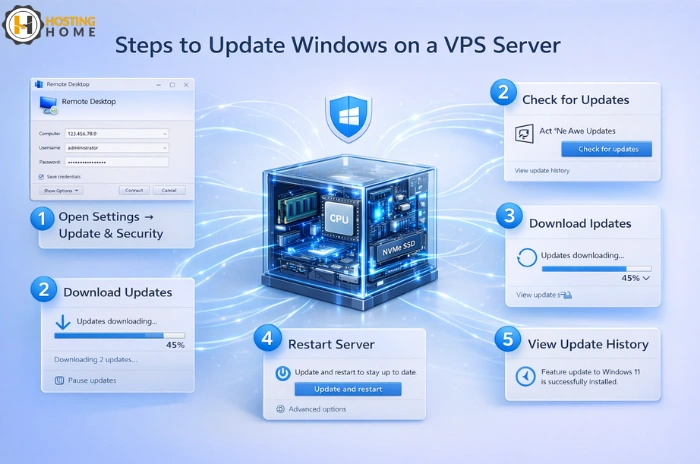
Step 1: Open Window Update Settings
After logging in, click on the Windows settings panel.
- Click the Start button
- Open Settings
- Select Update & Security
- Click Windows Update
This section indicates whether there are updates required for your server.
If you are using the windows vps hosting india, updates usually come up automatically when new security patches are released.
Step 2: Check for Available Updates
In the Update & Security panel, click on Check for updates.
The server will connect to Microsoft’s update service and download available patches.
These updates may include the improvements to the windows vps system including internal components.
After being downloaded, the system may prompt for a system restart to complete installation.
Step 3: Restart the Server if Required
Many updates require restarting the computer. Restarting the server so that the system can take into effect security fixes and system improvements.
Before you can restart your vps server windows, make sure:
- Important files are saved
- Running applications are terminated
- Scheduled tasks are paused
Your server will remain running with the new updated system.
Step 4: Turn on Automatic Updates
To avoid missing out on updates in future, allow automatic updates.
Automatic updates help your windows vps hosting environment to remain shielded without any manual work.
This feature is particularly helpful for businesses that have multiple servers.
Step 5: Monitor Update History
After installing updates, you can view them at the Update History section.
This helps administrators to track which updates were installed and when.
Monitoring updates helps your vps windows server to be secure and well maintained.
Updating Windows on Budget VPS Servers
Some business prefers cheap windows vps server india plan to control costs. Even budget servers need regular updates to be secure.
While some users try with free vps server windows or free windows vps options for testing, production servers need to always be maintained with care with proper updates.
When it comes for selecting hosting it is important to choose a trusted provider.
Choosing the Right Windows VPS Provider
When planning to buy windows vps hosting, you need to look out for providers with stable infrastructure and strong security features.
A good hosting provider must include:
- Regular system support
- Secure network environment
- Backup options
- Reliable uptime
Businesses who are looking to find the best windows vps, they compare the performance, support and the pricing before they buy windows vps server hosting.
Why Choose Hosting Home for Windows VPS Hosting
If you are planning to buy windows vps hosting in india, Hosting Home provides powerful and secure vps hosting solutions.
Hosting Home offers high-speed servers that are designed for websites, applications, and remote work environments.
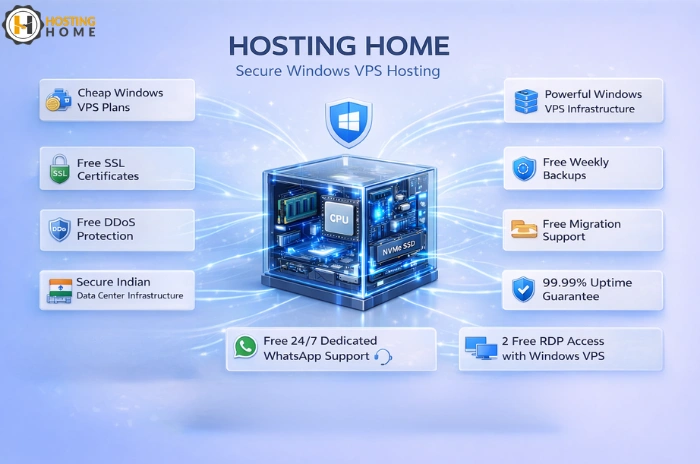
- Powerful windows vps hosting india infrastructure
- Cheap windows vps plans
- Reliable vps server windows performance
- Free SSL certificates
- Free weekly backups
- Free DDoS protection
- Free migration support
- 99.99% uptime guarantee
- Free 24/7 Dedicated WhatsApp support
- Secure Indian data center infrastructure
- 2 RDP access Free with Windows VPS hosting
If you need a server for websites, business applications or remote access, Hosting Home provides stable and secure windows vps hosting solutions.
If you are looking a trusted windows vps india provider with affordable pricing and strong performance, Hosting Home comes with one of the best windows vps solutions for businesses in 2026.